

If your business emails are hitting your customers’ spam folders, you have a big problem on your hands. In my opinion, this should be a business’s number one priority to fix.
Most email spam comes from unscrupulous people usually trying to scam, hack or at the very least trying to push a crappy offer. But sometimes, legitimate businesses find that their important emails are getting stuck in the dreaded spam folder.
I’ve seen it happen to law firms, software startups and funny enough, junk removal businesses. Jokes aside, it’s unfortunate because these are legitimate businesses that have been unfairly lumped in with spammers. In some cases, no one at the business is even aware that it’s happening.
In this post, we’re going to go over what usually causes these problems. But first, we need to discuss an important distinction between your domain name, your DNS service and your website.
Don’t feel like you have to figure it all out yourself. If you’d like some help, contact us here and we’ll be happy to help.
Registrars vs. Web Hosting vs. a DNS Service – What’s the Difference?
Your domain name (e.g., example.com) is registered at a registrar. A lot of people buy their domain name at domain name registrars like GoDaddy, Namecheap and Network Solutions. They may also purchase their website hosting from one of these companies. However, they don’t need to be at the same company. Often, the domain was purchased at a different company, while the web hosting was purchased at another.
This can be a source of confusion for some people. By logging into your accounts, you can figure out what you bought where. Give it a shot and write it down.
Another possible point of confusion are DNS services. Some people will use services like Cloudflare to handle their DNS. The DNS provider can be an intermediary between your registrar and your web host. You’re not required to use a DNS service – all DNS functions can be handled by your domain name registrar.
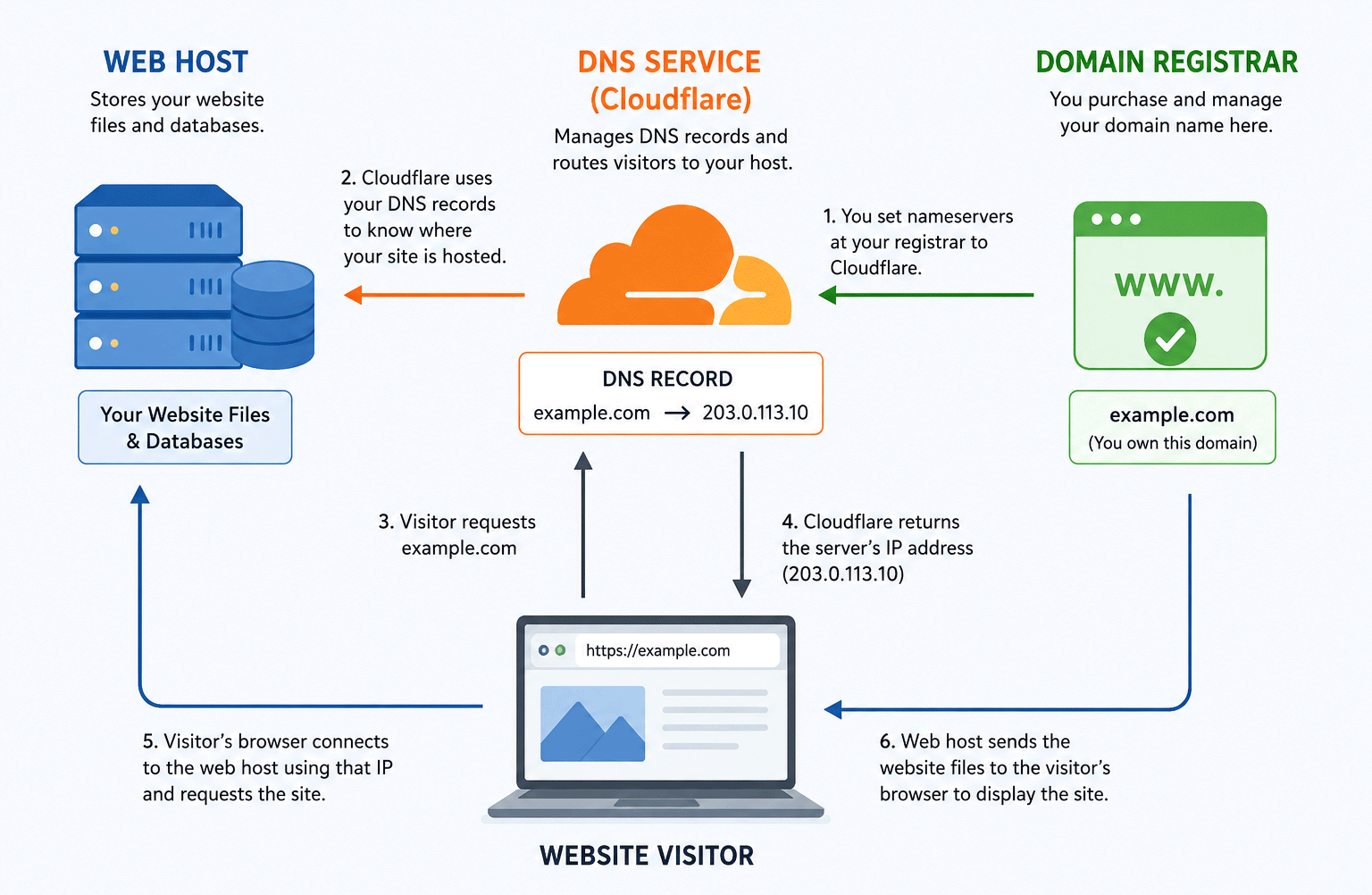
How your website, domain name and DNS service work together.
If you do a Whois lookup, you can find out what service is controlling your DNS. I tend to use whois.domaintools.com to see where the DNS of a website is located. This service can also tell you where a domain name is registered. This is a free service and it comes in very handy!
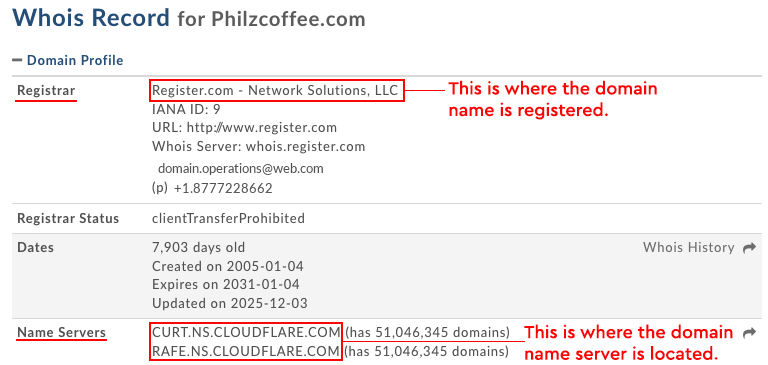
How to Fix Your Business Email from Going to Spam
Disclaimer: Below is the general idea on how to fix or improve your email deliverability. Trying to fix these things yourself can make your website(s) and email service unusable. Consider contacting a professional to help you.
If you purchased your domain name and web hosting from the same company, you can try contacting support and they may help you with what we’re going to talk about below. Some web hosting companies have super helpful customer support and make it a breeze – others, not so much. Either way, it’s always worth a shot!
The name of the game for email deliverability (what it’s really called) is to make your domain name trustworthy to the global email ecosystem. You can do this by creating DNS records that establish trust and define policies for your domain.
Step 1. Set Up Your SPF Record
Wherever you control your DNS records, you’re going to want to log in there and create an SPF record for your domain.
Your email service provider will have a specific SPF record that you will need to add to your DNS records. Usually the instructions are pretty straightforward, but the first time around it may feel pretty technical and somewhat confusing.
SPF records are super important because they tell the global email ecosystem what servers are allowed to send email for you. If you don’t set this up, people can “spoof” your email address and send email to people from different servers that aren’t yours – pretending to be you. If you’ve heard the term ‘phishing,’ this is one of the techniques attackers use to make it work.
The tricky part when it comes to SPF records is that you can only have one record. Sometimes you’ll need to jerry-rig and combine SPF records. This can cause people a lot of trouble.
Step 2. Set Up Your DKIM Record
The next step will be to create a DKIM record. Similar to SPF records, you’ll add this to your DNS records. If you’re wondering what a DKIM record does: it cryptographically signs your email and ensures the email wasn’t tampered with during transmission.
Step 3. Set Up Your DMARC Record
DMARC tells the global email ecosystem to reject any emails that can’t be authenticated or trusted. That way, if hackers are spoofing your email, you can tell the world to reject that email. This helps protect your domain and makes you a good steward.
Step 4. Tell People to Whitelist You. Or Mark “This Message Is Not Spam”
The simplest thing to do here is to add a message to your email signature to “whitelist” your email address. Some people use email services where they can whitelist trusted email addresses. This is kind of old school, but it can’t hurt to do it.
The other thing you can do if someone says they found your email in spam is ask them to mark it as “Not spam,” say if they have a Gmail address. It can help a bit, and probably always worth the effort.
Step 5. DO NOT SPAM PEOPLE
Spamming is emailing anyone without their permission. So don’t:
- Buy a list of emails and email the entire list at once.
- Scrape the internet for emails and email all the email addresses you grabbed.
- Collect a bunch of emails from someone’s BCC list and email those emails.
If you spam people, your sender reputation will get destroyed. This will bring you back to square one.
A Word About Self-Hosted Email
It’s somewhat rare these days, but some businesses will set up their business email through their web host or web server. Meaning they will log in to their web host and create email addresses. Some will use a webmail client to send and check email. But the bottom line is they are hosting their own email server.
Out of the box, this method is usually guaranteed to ensure all email hits the spam folder. You’ll definitely need to set up all the records mentioned above. Also, if the server or IP address has ever been used for email spamming, it will be really hard to ever have a good sender reputation. This can be a bigger problem if you’re doing this from a shared web hosting environment.